
Event Photo Watermarks and Overlays: A Brand Guide
See 4 event photo watermark and overlay styles from real events, plus exactly which logo, watermark and overlay files to prepare. Free checklist PDF.

6 min read

An event photo watermark is a small logo placed on the photos guests receive, so your brand travels with every image they post. A photo overlay goes further: a branded frame, bars or title graphic on top of the photo. This guide shows 4 watermark and overlay styles from real events, explains the difference between a logo, a watermark and an overlay, and lists exactly which files to prepare.
Download the event photo branding checklist (PDF)
Why Event Photo Watermarks Matter
When a guest posts a photo from your event, their followers see it. A watermark makes sure they also see who made the moment happen.
Brand visibility at scale. Every shared photo carries your logo, across Instagram, TikTok, LinkedIn and WhatsApp.
Sponsor value. A sponsor's logo on every delivered photo keeps them visible long after the event ends.
Consistency. Every image carries the same mark, even with several photographers working the room.
Memory. When guests open their gallery weeks later, your brand is part of the memory.
4 Event Photo Watermark and Overlay Styles (With Examples)
1. Corner Watermark
One logo in a corner of the photo. It's the simplest option: photographers shoot the full picture, and the mark credits the brand without changing the shot.
At POSSIBLE, every delivered photo carried the event logo in the bottom-right corner.

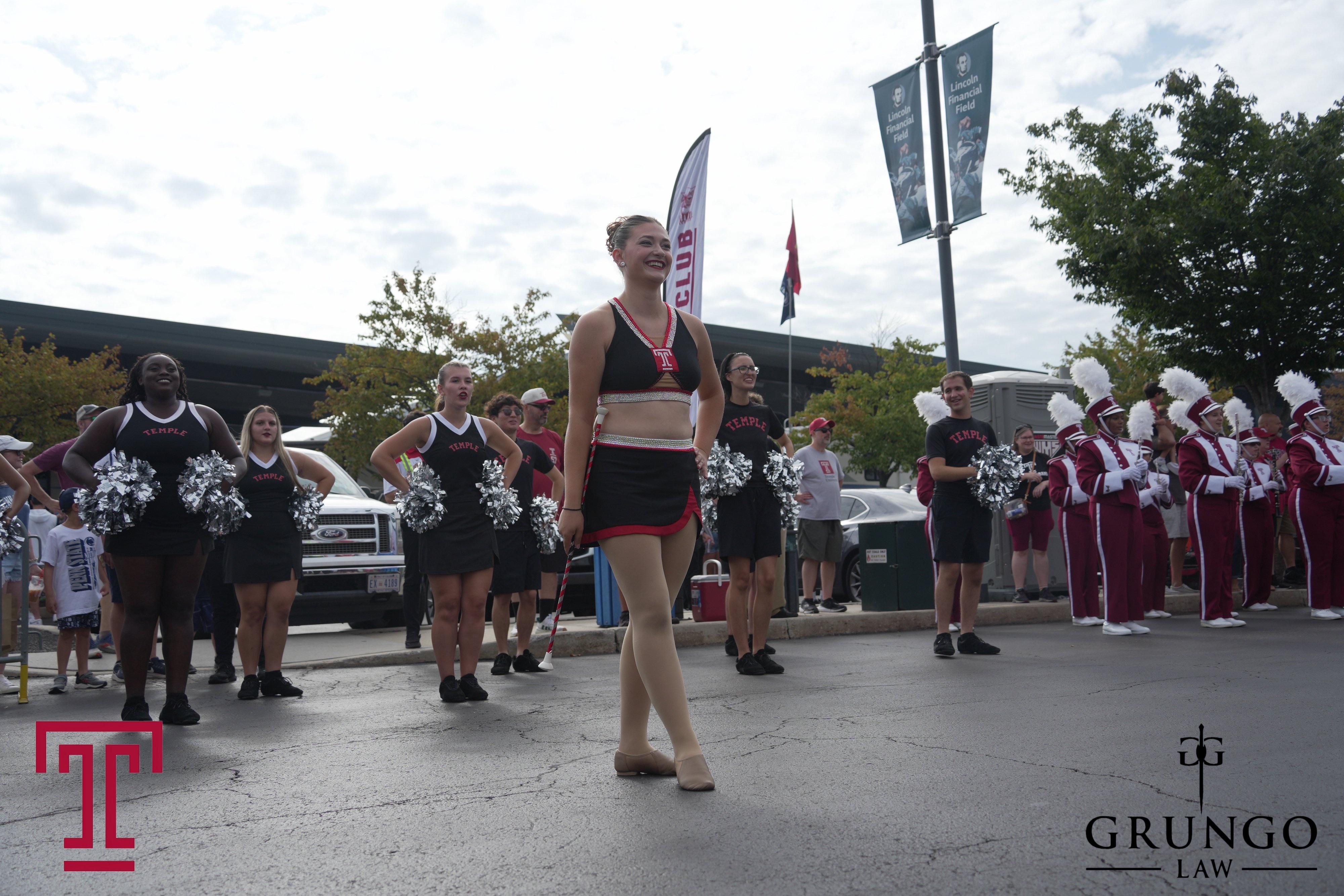
2. Host and Sponsor Logos
A logo in two corners credits both the host and a sponsor. It's the easiest way to give sponsors visibility without a full frame.
Temple University used this treatment on band and cheer photos at its game day tailgate, with the Temple logo in one corner and its sponsor, Grungo Law, in the other.
3. Full Branded Frame (Overlay)
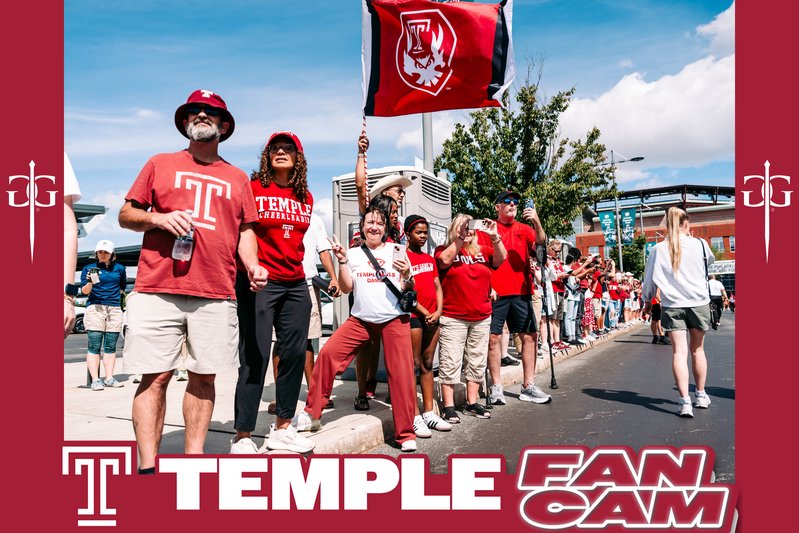
A frame around the photo with your logo, colors and campaign name. It's the most visible option and works best when guests expect a keepsake, like a fan cam or a launch party.
Temple's fan photos arrived inside a Temple FanCam frame, with the sponsor's mark on both sides. 450+ fans signed up at the tailgate alone, so the sponsor appeared in every fan's gallery. Read the Temple FanCam case study.
4. Minimal Text Mark
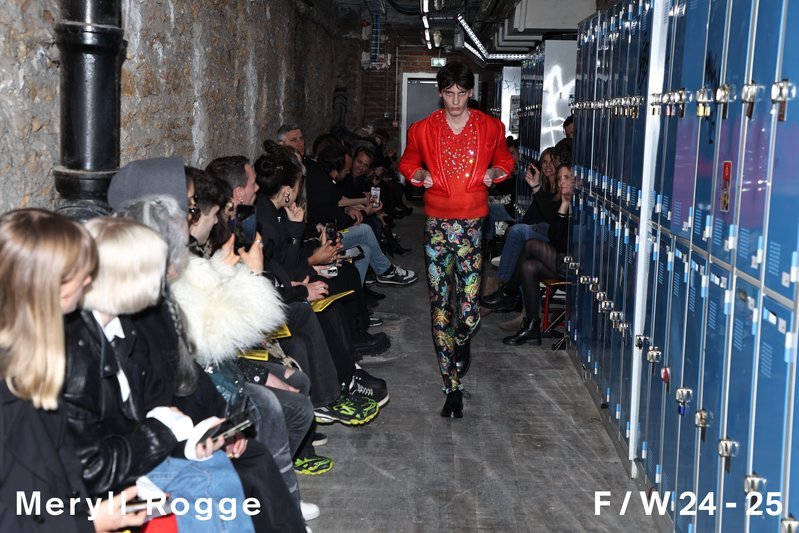
A single line of text, like the brand name and collection, set in your brand's type. It's the subtlest option and suits fashion, luxury and editorial events, where a logo would compete with the look.
At the Meryll Rogge F/W 24-25 show during Paris Fashion Week, runway photos carried the designer's name and season along the bottom edge.
Logo vs Watermark vs Photo Overlay: What's the Difference?
These are 3 different files, and they aren't interchangeable:
Signup and gallery logo: the mark at the top of the signup page, personal gallery and QR page.
Watermark: a small stamp on delivered photos, usually in a corner. It isn't a frame.
Photo overlay: a graphic on the photo, such as bars, corners, a title lockup, a 4×6 print frame or a collage. Photo booths often call this a photo booth overlay.
A gallery logo isn't a watermark, a watermark isn't an overlay, and a 4×6 print file isn't the signup header. Pick a watermark when the photo should speak for itself, and an overlay when the photo is meant to be a branded keepsake.
What Files to Prepare for an Event Photo Watermark
Send a PNG with a transparent background, cropped tight, in 2 versions:
A full-color version for light photos
A white (knockout) version for dark photos
Send one mark, not a 4×6 frame. Impulse sizes and places it.
Avoid these common mistakes:
A white-only logo. It disappears on light photos.
A brand guidelines PDF or Illustrator file with no PNG cutout.
A 4×6 overlay or print frame. That's the photo overlay, below.
A JPEG photo of the logo, like a picture of a sign or a bottle.
What Files to Prepare for a Photo Overlay
Photographers shoot both vertical and horizontal photos, so one design can't fit both. A single 4×6 PNG made for one orientation will crop or add bars on the other. Send one of these:
Vertical and horizontal versions of the overlay, or
A layered Photoshop or Illustrator file with the bars, corners, title and logos on separate layers, plus a PNG or PDF proof that opens without Photoshop.
The layered file is the easiest option. It lets the production team build both orientations from it.
Don't send a single flattened PNG in one orientation with no source file, the gallery logo or a simple corner watermark.
Event Photo Branding Checklist
Signup logo: PNG, transparent background, about 800 to 1,200px wide, tight crop. 1,200×400 works as a single size.
Watermark (optional): color PNG plus white PNG, transparent, tight crop.
Overlay (optional): vertical and horizontal versions, or a layered PSD or AI file plus a PNG proof.
Download the checklist as a PDF to share with your design team.
How Watermarking Works With Impulse
You send your files, or Impulse's creative team designs them with your brand team.
You choose placement and which photos get a mark, for example every photo or only certain moments.
Impulse applies the watermark or overlay automatically as each photo is captured.
AI checks that the logo doesn't cover faces, products or key details. Photos at risk are flagged for review.
Guests receive their photos by SMS or WhatsApp in under 60 seconds, with the branding already in place.
You can also offer two versions of each gallery, with and without the watermark. Guests choose what to save or share.
More Event Photo Watermark Examples
Spirits activations: Espolon delivered watermarked photos in the same WhatsApp thread as its Cocktail Fights quizzes and voting. Photographers captured 700+ photos, and guests downloaded 140+. Read the Espolon case study.
Sampling tours: Vita Coco sent branded action shots to guests at its sampling stand. 650+ photos were downloaded, with an estimated 200K+ potential social impressions from saved photos. Read the Vita Coco case study.
Event Photo Watermark FAQ
What file format should an event photo watermark be?
A PNG with a transparent background, cropped tight. Send a full-color version for light photos and a white version for dark photos.
What file format should a photo overlay be?
Vertical and horizontal PNG versions, or a layered Photoshop or Illustrator file with each element on its own layer, plus a PNG or PDF proof.
Do watermarks stop guests from sharing photos?
Not when they're designed well. Keep the mark small, consistent with your brand and away from faces. Offering a version without the watermark also gives guests the choice.
Can sponsors have their own watermark?
Yes. You can place a sponsor's logo alongside yours, like Temple and Grungo Law, or create a sponsor-specific mark for one area or moment of the event.
Is watermarking done by hand?
No. With Impulse, watermarks and overlays are applied automatically as each photo is captured and delivered.
Put Your Brand in Every Shared Photo
Impulse delivers branded event photos to guests by SMS or WhatsApp in under 60 seconds, with no app required. See how event photo sharing turns guest posts into social reach, try custom photo filters for a consistent look, or book a demo and we'll mock up your watermark together.
Take the Next Step with Impulse
Start your journey toward more engagement, greater social reach, and data driven decisions. Use Impulse and unlock your events' full potential.